What's New
 Highlights
 Available for all users
Available for all users
Available for all users
Release Notes
Available for all users
Available for all users
Available for all users
Available for all users
Release Notes
Version September 10, 2026 - 26.9.0
EMEA - September 10, 2026
AMER - September 16, 2026
JAPAN - September 17, 2026
APAC - September 17, 2026
Customize RCS Video Previews with Thumbnail Images
Available to all customers
Background
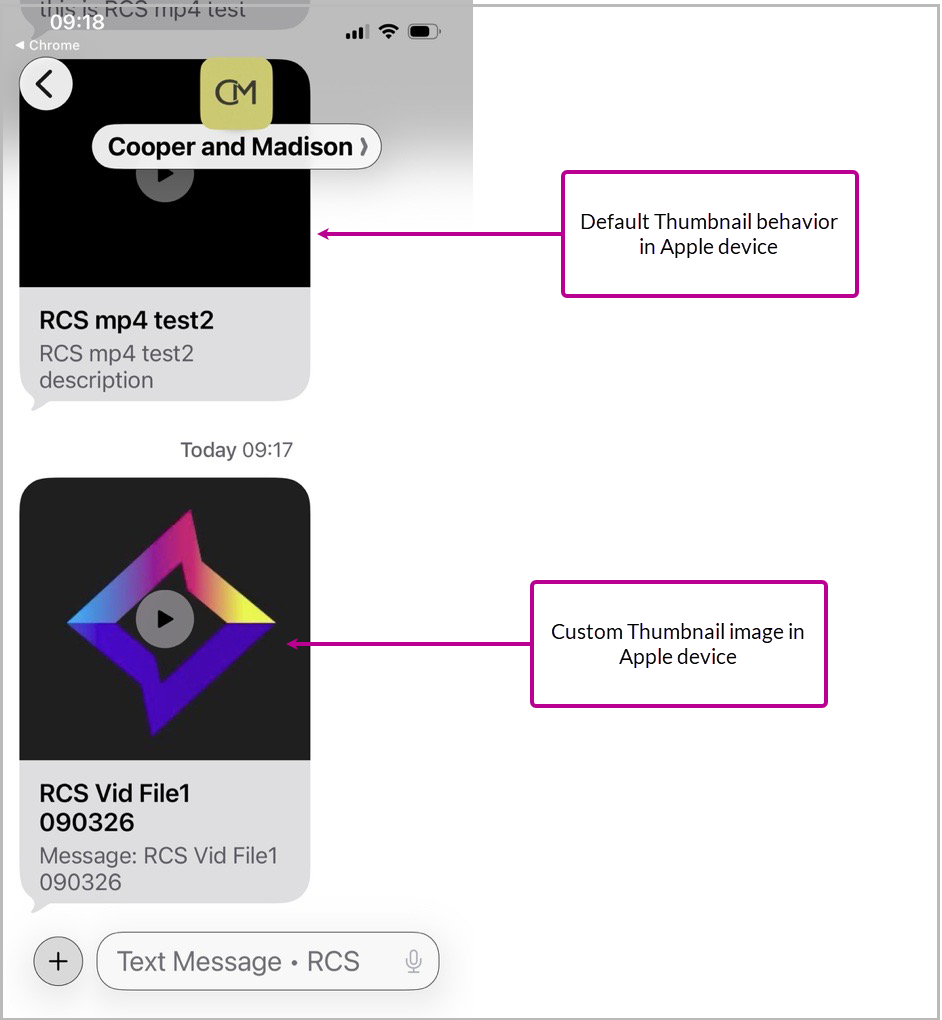
Customers can now upload a custom thumbnail image for an RCS video. This gives marketers more control over the preview image displayed before video playback and helps provide a more consistent experience across supported devices. Previously, the video thumbnail relied on the default thumbnail behavior from Google and Apple, which could result in different preview experiences, including a blank image on some Apple devices.
In-product details
The RCS message editor now includes a Custom Video Thumbnail (optional) field below the primary Media selector. You can use the field to:
-
Search for an existing image in Hosted Items
-
Upload a new image to Hosted Items
-
Enter the URL of an externally hosted image
The custom thumbnail supports JPG, JPEG, and PNG files up to 100 KB. The thumbnail upload is optional. When no custom thumbnail is provided, the default video thumbnail is used. When a custom thumbnail is provided, it is displayed as the video preview image instead of the default thumbnail.
Drive more action with Personalized RCS links
Available to all customers from September 17, 2026
Background
This enhancement extends URL personalization to RCS campaigns, allowing personalized values to be used in campaign URLs.
In-product details
You can use personalized URLs in:
-
Basic RCS message descriptions
-
Open URL suggested actions in buttons and chips
-
SMS fallback content
Recipients can click the personalized URL and access the destination with the personalized value retained. The enhancement also supports URL personalization when link shortening is used.
Personalization merge tags can be added through Append Code, including values such as campaign ID, message ID, and outreach identifier.
Easily see Preferences for Open Pixel Tracking in Record Details
Available to all customers
Background
The Preference for Tracking table separates tracking consent information from the Sender Profile table in Record Details. This makes Open Pixel Tracking consent easier to identify and provides a structure that can also support additional tracking preferences in the future.
In-product details
The Preferences tab in Record Details now includes a Preference for Tracking table beneath the Sender Profile table. The table displays the Open Pixel Tracking consent status and the last modified date.
The Open Pixel Tracking status can be:
-
Consent
-
No Consent
-
No Preference Available when no Open Pixel Tracking consent value is available
The Sender Profile table no longer displays the tracking consent status.
New Support for Tracking External Links
Available to all customers
Background
External Link Tracking allows embedded external links imported into the platform to be tracked for email campaigns. The capability supports reporting on link engagement through existing click tracking, eliminating the need for custom tracking workarounds.
In-product details
External links embedded in imported data can be tracked when the link is stored in a supported data field or AET metadata field. The tracking capability:
-
Records link information for reporting and tracking through existing click tables
-
Supports deep linking when embedded links are used in supported scenarios
-
Allows marketers to specify a friendly name for each link for reporting
-
Allows marketers to specify whether an embedded link should be tracked
-
Supports URL values stored in supported string or blob fields
-
Reporting is available through Campaign reporting only and not available in Real Time reporting currently.
External Link Tracking is an optional feature that must be enabled in your account. Please speak with your Zeta Representative for more details.
Easily Format and Track URLs used in Personalization
Available to all customers
Background
When a URL is used for personalization, the resulting link can include an additional HTTPS prefix in the format that prevents it from being tracked. Previously, resolving this required custom technical work.
In-product details
When adding a URL field to your message content, select Strip HTTPS from the Formatter drop-down. This removes the additional HTTPS prefix, allowing the link to work with Link Tracking.
Note: This feature is currently available only for Campaigns in the Email channel. The feature will eventually be rolled out to mobile channels as well.
Release & Maintenance schedule
See Cheetah Digital Upcoming Release Schedule for the platform release.
See System Maintenance for details on the next system maintenance window.
Platform Status
The status page provides you with regular updates regarding the status of the Cheetah Digital by Zeta platform in the event of a major system incident in your region. In this article we’ll explain the information you will see and how to subscribe to the Cheetah Digital by Zeta notification system to receive regular updates on the platform status, which we highly recommend to all users.
See Platform status page for current Cheetah Digital platform status.
See Platform Status documentation for instructions on signing up for notifications.